Ever since I had this unit installed I find that I can see the emails from the moment they come in and I can reply to them just as fast. The communication is really smooth and it has worked wonders on the quality of my signal. It is my one prayer that it remains that way for a long time.
Mobile Booster Dual Band – Telstra Calls + 4G – 600 sqm.
(Telstra)
Having an average mobile data signal reception in the place of business can cause distress not only to your employees but to your clients as well. Don’t settle for less and go up to full strength signal with this great booster. We want to make this experience as smooth as possible for you, so our installation kit contains everything you need for a quick step-by-step setup, and the instructions are simple and will guide you through the whole process. If you feel confused at any point, we’re here to help and answer your questions via a 24/7 support line. This device is perfectly safe and meets all of the required standards. If you are still on the fence, consider the joy of free delivery, 2-year warranty on every product, and if, for any reason, you are not completely happy with your purchase, you can return the product within 30 days for a full refund!
- Technical Sheet
-
Coverage up to 600 sqm -
Use Medium Home
Large Home
Large Office
Small Hotel -
Operator Optus (4G)
Vodafone (4G)
Telstra (Calls & 4G) -
Frequency 850/1800 MHz -
Number of simultaneous users 75 -
Up-link 824 ~ 829 MHz
1710 ~ 1785 MHz -
Down-link 864 ~ 894 MHz
1805 ~ 1880 MHz -
Voltage AC90-264V,output DC 5V / 3A -
Dimensions 22.5*14*5 cm -
Weight 1.15 kg
-
Max Gain ≤70dB -
Bandwidth 25 MHz / 60MHz
-
Ripple in Band ≤8dB -
Output Power 23-27dBm -
Noise Figure @ max. gain 4.5db 8db
-
Return loss ≤-8 dB
-
Time Delay ≤0.5 μs
-
MTBF > 20000 hours
-
Power Supply AC:90~265V, 50/ 60Hz;DC:5V 2A
-
Power Consumption 4W
-
Impedance 50 Ω
-
RF Connector N -Female
-
Cooling Heat sink Convection cooling
-
Operating Temperature Operation: - 10°C ~+ 55°C / Storage: -20°C ~+60°C
-
Power -
Red Normal -
Off DC power problem
-
-
DL (Downlink) -
White No signal received Solution: Adjust the outdoor installation to get the sound signal -
Green Signal received ok but not perfect -
Red Full signal received
-
FAQ
-
Why a mobile signal booster is the best solution for poor reception?
A mobile signal booster is the only working solution if you have a weak signal and dead zones. It helps to improve signal strength so you can access the internet more quickly, and stream videos without buffering.
With our booster you can make and receive calls without interruption, ensuring you’re always in touch with your family and friends.
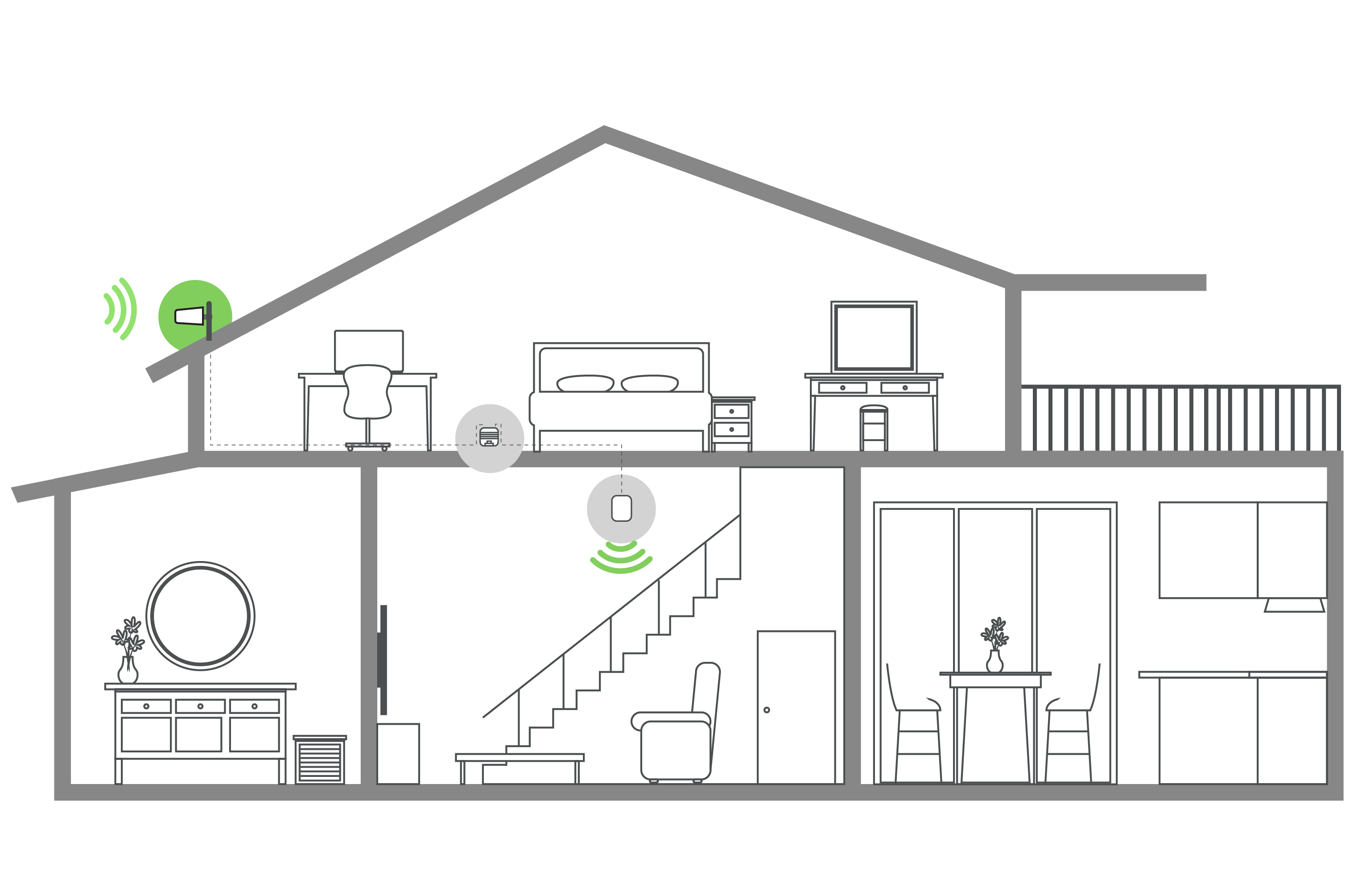
In general, the booster catches the signals from the nearest cell tower in the area by the external antenna which is included in the kit, then it sends the signal to the booster box. The box amplifies the signals, ensuring reliable coverage even in areas with poor signal strength, and the internal antenna spreads the signals inside the closed area. -
Please, help me to find the best booster. How do I know Which one?
If you want to find the best booster for you there are 2 easy options:
1. Use our Booster Finder Wizard to find the best booster based on your needs.
2. If you’re still having trouble finding the right booster after using the Wizard, contact our technical support team via chat or phone. They’ll be happy to assist you in finding the best solution. -
What make your boosters different?
1. At australiamobileboosters.com, we are committed to providing high-quality boosters at unbeatable prices.
2. Since 2010, we’ve been dedicated to improving cellular signals with our specialized boosters, putting our CUSTOMERS FIRST every step of the way.
3. Our boosters fix more than the signal. Our customers enjoy fewer dropped calls, better voice quality, faster internet speeds, and improved video streaming.
4. In addition, we provide peace of mind with our industry-leading 24/7 after-sale service:
– Lifetime Support
– 2-Year Warranty
– Installation Services (for enterprise solutions)
5. And if it’s not a perfect solution for you, we’ll refund your purchase or replace it. No hard feelings. -
Does this need installation? Can I set it up myself?
Installing our boosters is easy – in fact, 98% of our customers do it themselves. The device is plug-and-play, so all you need to do is attach the units with cables and mount the antennas. We provide simple installation guides and videos to help you along the way.
Moreover, we offer technical aftersales support after the delivery of your device, so you can have peace of mind knowing we’re here to help.
How it works
Reviews:
ASK A QUESTION
I do not have Wi-Fi in the house that I currently live in. So whenever I want to do something on my laptop I use my phone to tether. Slow internet speeds on my phone means little or no network on my laptop and that grates my poor nerves raw. I bought this unit to improve the internet quality and true to its word, my download speeds are very much faster. This bothered me for a long time I am glad it’s over.
I do not have Wi-Fi in the house that I currently live in. So whenever I want to do something on my laptop I use my phone to tether. Slow internet speeds on my phone means little or no network on my laptop and that grates my poor nerves raw. I bought this unit to improve the internet quality and true to its word, my download speeds are very much faster. This bothered me for a long time I am glad its over.
The installation is relatively easy. Perhaps the hardest part that I experienced was positioning the outdoor antennae, which was made harder by the fact that the cables were too short. It took me ages to get it right. Is there any way at all that the cables can be made any longer? I could really use longer cables myself.
The frustration of my calls getting dropped every now and again made me get this unit and have it installed. Dropped calls annoy both the caller and the receiver and I have annoyed a lot of people in my time. Ever since this unit was installed, I have never experienced a single dropped call.
WRITE A REVIEW