Well worth the money. Makes 1 bar 4 bars in most place and makes no signal into a good signal so far. Love it! highly recommend
Telstra NextG Booster – Calls – 600 sqm. (Power Line)
(Telstra)
We completely understand the grief of not being able to finish a simple phone-call or reach your e-mail on time. Desperation can wait, as this powerful beast will provide the solid 5 bar connection you need, even if the outside signal is not higher than 1 bar. This great model will work wonders in your office, small hotel, warehouse, or boat. You won’t need any professional help with installation, either. Our set-up kit comes with all of the necessary details and a set of instructions to get your new, powerful system up and running in just a few simple steps. Should you run into any sort of trouble along the way, feel free to contact our 24/7 support line to get help. We care about your shopping experience so we provide everything we can for your convenience. All of our products are delivered free of charge and are complete with a 2-year warranty, as well as a 30-day money-back guarantee.
- Technical Sheet
-
Coverage up to 600 sqm -
Use Medium Home
Large Home
Large Office
Small Hotel -
Operator Telstra (Calls) -
Frequency 850 MHZ -
Number of simultaneous users 75 -
Up-link 824 ~ 849 MHz -
Down-link 869~ 894 MHz -
Voltage AC:90~265V, 50/ 60Hz;DC:5V 2A -
Dimensions 21×12×3 cm -
Weight 0.85kg
-
Max Gain -
Uplink ≤85dB -
Downlink 78dB
-
-
Bandwidth 25 MHz -
Ripple in Band ≤8dB -
Max. Input Power Without Damage 0 dBm -
Noise figure @ max. gain -
Uplink 4.5db -
Downlink 8db
-
-
Return loss ≤-8 dB -
Time Delay ≤0.5 μs -
MTBF > 20000 hours -
Power Consumption 4W -
Impedance 50 Ω -
RF Connector N -Female -
Cooling Heat sink Convection cooling -
Installation Type Wall Installation -
Environment Conditions IP40 -
Humidity <90% -
Ambient temperature Operation: - 10°C ~+ 55°C / Storage: -20°C ~+60°C -
Power -
Red Normal -
Off DC power problem
-
-
DL (Downlink) -
White No signal received Solution: Adjust the outdoor installation to get sound signal -
Green Signal received ok but not perfect -
Red Full signal received
-
-
UP (Uplink) -
Flicker When there is a call it is normal -
Green Always green means self-excited Solution: Turn off the booster, adjust the indoor and outdoor antenna again and try to expand the distance or create some barriers between them.
-
FAQ
-
Why a mobile signal booster is the best solution for poor reception?
A mobile signal booster is the only working solution if you have a weak signal and dead zones. It helps to improve signal strength so you can access the internet more quickly, and stream videos without buffering.
With our booster you can make and receive calls without interruption, ensuring you’re always in touch with your family and friends.
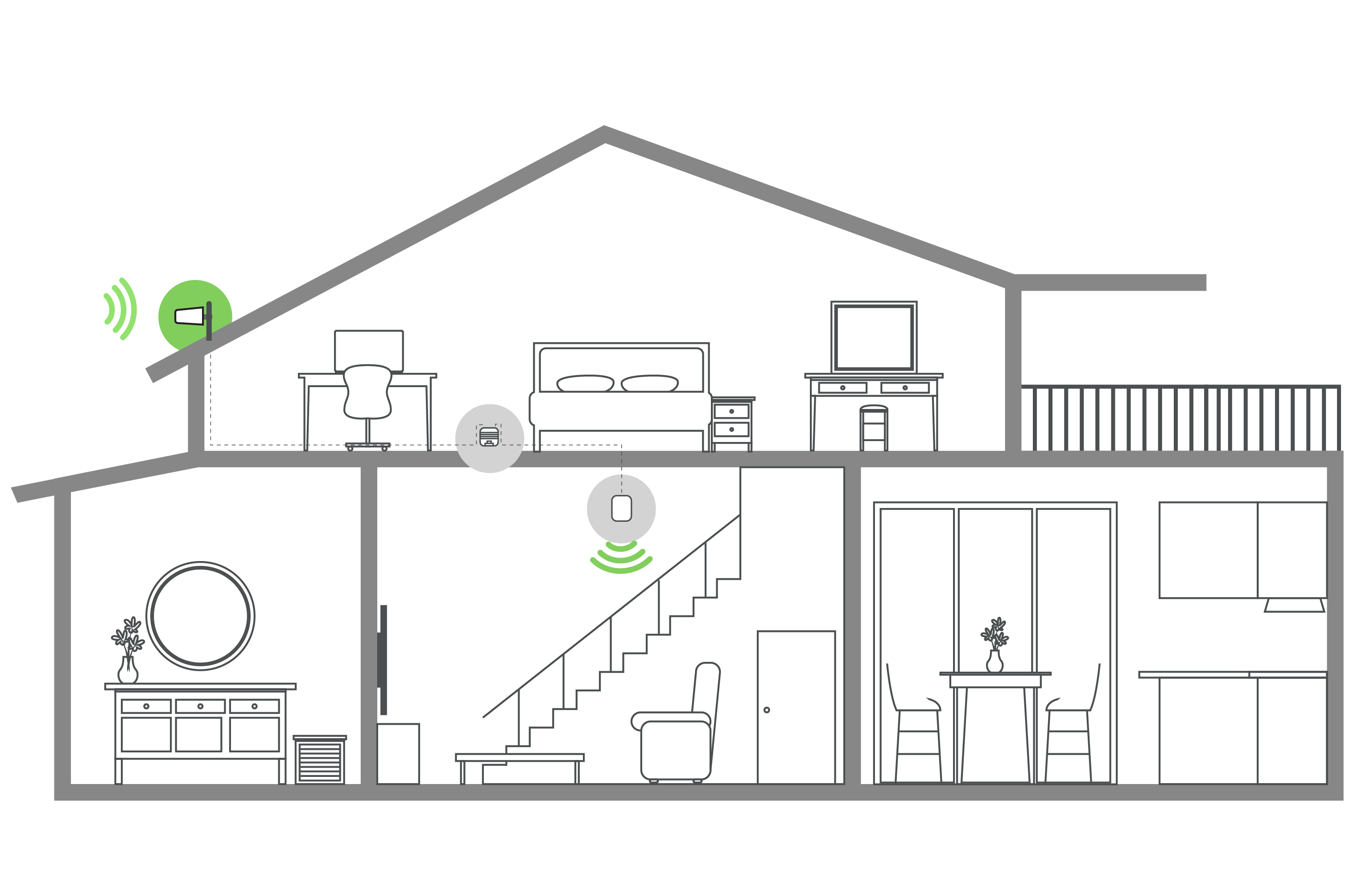
In general, the booster catches the signals from the nearest cell tower in the area by the external antenna which is included in the kit, then it sends the signal to the booster box. The box amplifies the signals, ensuring reliable coverage even in areas with poor signal strength, and the internal antenna spreads the signals inside the closed area. -
Please, help me to find the best booster. How do I know Which one?
If you want to find the best booster for you there are 2 easy options:
1. Use our Booster Finder Wizard to find the best booster based on your needs.
2. If you’re still having trouble finding the right booster after using the Wizard, contact our technical support team via chat or phone. They’ll be happy to assist you in finding the best solution. -
What make your boosters different?
1. At australiamobileboosters.com, we are committed to providing high-quality boosters at unbeatable prices.
2. Since 2010, we’ve been dedicated to improving cellular signals with our specialized boosters, putting our CUSTOMERS FIRST every step of the way.
3. Our boosters fix more than the signal. Our customers enjoy fewer dropped calls, better voice quality, faster internet speeds, and improved video streaming.
4. In addition, we provide peace of mind with our industry-leading 24/7 after-sale service:
– Lifetime Support
– 2-Year Warranty
– Installation Services (for enterprise solutions)
5. And if it’s not a perfect solution for you, we’ll refund your purchase or replace it. No hard feelings. -
Does this need installation? Can I set it up myself?
Installing our boosters is easy – in fact, 98% of our customers do it themselves. The device is plug-and-play, so all you need to do is attach the units with cables and mount the antennas. We provide simple installation guides and videos to help you along the way.
Moreover, we offer technical aftersales support after the delivery of your device, so you can have peace of mind knowing we’re here to help.
How it works
Reviews:
ASK A QUESTION
I have been looking for a good access point for a while and this is perfect. Reliable and very simple to set up.
We live many miles away from the city, and cell service is terrible. To make a call, you have to walk like 50 yards away from the house. This booster made a significant improvement. From zero service, we now get 3-4 bars of signal everywhere in the house.
I built an industry just outside London and the network wasn't so great. So, what I needed was a signal booster that would accommodate many users and cover a wide area at the same time. I have to say this was my perfect choice and I'm quite pleased I made the purchase.
I have really poor signal, but you can understand why. My house sits between two valleys. However there are two towers around me, and sometimes I get a few bars on my cell, but there's no consistency whatsoever. I bought this device, and from the comfort of my house I can make phone calls and browse at my convenience.
WRITE A REVIEW